Table of Contents
ToggleWorking from home has become the default for millions, but a standard desk crammed into a corner doesn’t cut it anymore. An adjustable standing desk with storage solves two problems at once: it keeps you moving throughout the day (medical research consistently shows the health benefits of intermittent standing), and it eliminates the clutter that derails focus. Whether you’re setting up your first home office or upgrading an existing one, combining a height-adjustable work surface with integrated or paired storage gives you the efficiency of a custom workspace without the contractor price tag. This guide covers the types available, what to prioritize when shopping, how to set up your space smartly, and how to modify an existing standing desk if you already have one.
Key Takeaways
- An adjustable standing desk with storage eliminates clutter while promoting movement, keeping your work area clear and your focus sharp throughout the day.
- Motorized standing desks with integrated storage offer the best stability and ease of use ($600–$1,500), while manual models are cheaper but less convenient for frequent sitting-to-standing transitions.
- Combine desk height between 22–24 inches (seated) and 47–48 inches (standing) with ergonomic positioning—elbows at 90 degrees seated and 100–110 degrees standing—to avoid posture strain.
- If you already own a standing desk, simple DIY modifications like under-desk shelves ($60), side mobile cabinets, or wall-mounted shelves can add significant storage without replacement.
- Organize storage by frequency of use: daily-access items in the most convenient drawer, weekly supplies in secondary storage, and seasonal items elsewhere to prevent clutter creep.
- Test your complete setup (height, monitor placement, cables, and accessories) before permanently mounting anything, so you find your ideal ergonomic position and workflow.
Why Combine Standing Desks and Storage Solutions
A standing desk alone is great for posture and circulation, but without storage integration, you’ll end up piling papers, monitors, and office supplies on the work surface itself. That kills productivity faster than poor ergonomics.
Combining adjustable height with built-in or adjacent storage keeps your active work area clear and your materials within arm’s reach. You spend less time hunting for files, chargers, or writing tools, and more time actually working. Storage also lets you hide visual clutter, a major source of mental fatigue during long focus sessions.
From a practical standpoint, a desk with storage maximizes footprint efficiency. If your home office is tight (and most are), a single unit beats buying a separate filing cabinet or wall shelves. You save money, save space, and maintain a cohesive look. The efficiency gains are especially noticeable when you work from home full-time and your desk is always visible in your living environment.
Types of Standing Desks With Built-in Storage
Desk Models With Shelving and Cabinets
Many manufacturers now design standing desk frames with integrated shelving or cabinet bays underneath or to the side. These typically use the same motorized or manual height-adjustment mechanism as standalone models, but add a fixed lower shelf, drawer units, or side cubbies that remain stationary while the desktop rises and falls.
Motorized desks with lower shelves are the most practical for daily use. The motor handles two people’s combined weight, plus the weight of the desk itself, so adding static storage below doesn’t strain the mechanism. Look for desks with a weight capacity of at least 300 pounds when fully loaded. Expect to pay $600–$1,500 for a quality unit with memory presets and a stable frame.
Manual (hand-crank) desks with storage cost less ($400–$800) but require more effort to adjust. If you’re switching between sitting and standing every hour or two, a manual crank becomes tedious. Manual models work better if you’re mostly sitting with occasional standing sessions.
Drawer-style storage built into the frame works well for pens, notepads, and small items. Cabinet-style storage (usually on one side) is better for files, books, or equipment you don’t access constantly.
Standalone Storage Add-Ons and Accessories
Not everyone wants to buy a new desk. If you have a standing desk you like, you can add storage adjacent to it or underneath it without replacing the whole unit.
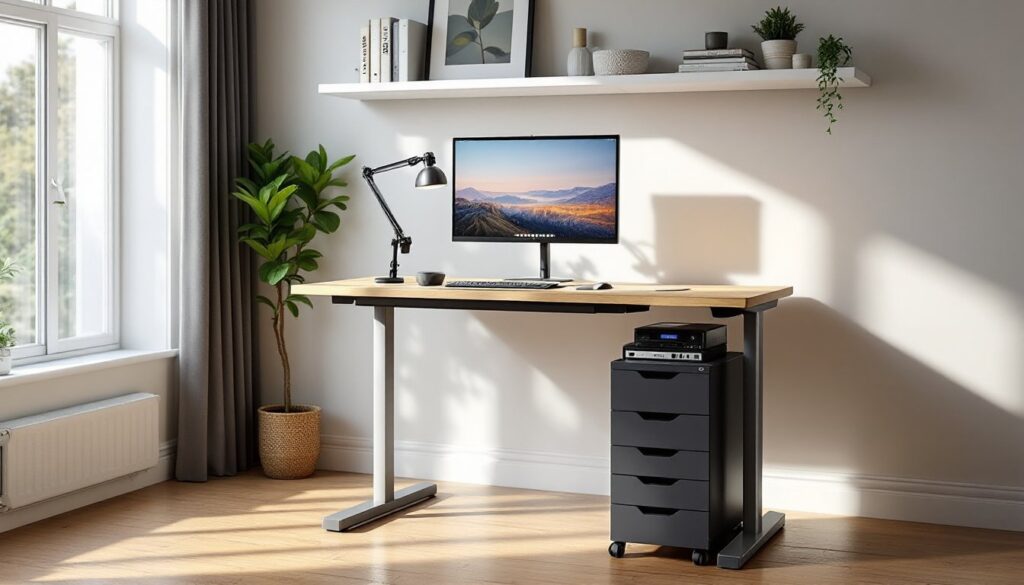
Under-desk shelf units slide between the desk legs and the floor, providing a low-profile storage surface for a CPU tower, files, or a printer. These are typically metal frames with one or two shelves and cost $80–$250. Install them so they don’t interfere with footrest room or legroom when you’re sitting.
Side cabinets and tower units roll on lockable casters or sit flush next to your desk. They’re modular, so you can remove them if you rearrange your office. A 2–3 drawer unit runs $150–$400 and works especially well if your desk doesn’t have built-in storage.
Wall-mounted shelves above or beside your desk free up floor space and keep items visible and accessible. Floating shelves rated for 20–30 pounds per shelf are standard: use quality wall anchors or studs to prevent sagging. This is a good budget option ($50–$150 per shelf, plus hardware) and lets you customize the number and spacing.
Key Features to Look For When Choosing Your Desk
Height range matters more than you’d think. Most standing desks adjust from about 28 inches to 48 inches, but if you’re taller than 6 feet or plan to use a footrest, verify the maximum height goes to at least 47–48 inches. Minimum height should be around 22–24 inches if you want comfortable seated work.
Desktop size and shape affect workflow. A 48×24-inch rectangular top is standard for one monitor and paperwork. If you have multiple monitors or do creative work, a 60-inch or L-shaped desk ($150–$300 more) reduces head turning and strain. Make sure the desktop depth accommodates your monitor arm and your natural reach.
Stability when raised is non-negotiable. Wobbling at full height means adjusting your posture constantly and fatiguing your core. Look for desks with crossbars, dual-motor systems, or anti-collision sensors. Motorized desks are generally more stable than manual crank models at full extension.
Cable management is underrated but saves hours of frustration. Desks with built-in channels, clips, or a cable tray underneath keep cords organized and out of the way as the desktop moves. Without it, you’ll spend time untangling cables every time you adjust height.
Storage accessibility matters in your layout. If your storage is a fixed lower shelf, it’s harder to reach while standing. Side cabinets or drawer units are more practical for daily access. Ask yourself: what items do I grab most often, and where should they be to minimize reaching or bending?
Material and build quality affect longevity. A solid steel frame with at least 1.5-inch vertical supports and a desktop of solid wood, engineered wood, or high-quality laminate will last years. Cheap particleboard desktops sag under weight: engineered wood is a good middle ground between price and durability.
Space Planning and Setup Tips for Your Home Office
Before ordering, measure your actual space and account for clearance. A standing desk needs at least 24 inches of clear floor space in front and behind for you to move and shift weight comfortably. If you’re adding a side cabinet, ensure it doesn’t block a walkway or doorway.
Desk height at a seated position should place your elbows at roughly a 90-degree angle when your hands rest on the keyboard. Standing position should keep elbows at about 100–110 degrees: your shoulders stay relaxed, not shrugged. Most people need a monitor about 20–26 inches away and at or slightly below eye level when standing. If your desk is too low or too high for your setup, no amount of storage will fix the ergonomic problem.
Organize storage by frequency of use. Items you access daily (current projects, pens, phone) go in the most accessible drawer or shelf. Reference materials, archives, and supplies you use weekly go in secondary storage. Seasonal or rarely used items belong in a filing cabinet elsewhere or on a higher shelf.
Zone your storage. Dedicated folders for different projects, labeled drawer dividers, and matching containers make it easy to find what you need in seconds. This prevents the slow creep of clutter that makes even a big desk feel cramped.
Consider the path of your monitor, keyboard, and any add-on accessories (monitor arms, footrests, surge protectors). Test the height adjustment a few times before permanently mounting cables or shelves. A small change in desk height can change your entire ergonomic setup, and you want to find your sweet spot before locking things down.
Lighting matters. A desk with storage might block natural light from a window. Add a task lamp ($30–$80) with a color temperature around 4000K (neutral white) to reduce eye strain during long focus sessions. Avoid direct glare on your monitor.
DIY Modifications: Adding Storage to Your Existing Standing Desk
If you already own a standing desk, you don’t need to replace it. A few modifications can add serious storage capacity.
Building an under-desk shelf is the most common upgrade. You’ll need two 2×8-inch boards (actual dimensions 1.5×7.25 inches) cut to length, four 2-inch L-brackets, a drill, and wood screws. Measure the distance between the desk legs and cut your boards to fit snugly. Use the L-brackets to attach the boards to the underside of the desk frame, not the desktop, so the shelf remains stationary as the desk moves. This gives you a sturdy platform for files or a printer and costs under $60.
Before drilling, check for existing cables or wires underneath your desk. Mark them clearly and route them away from your drilling path. Wear safety glasses and use a variable-speed drill set to medium speed to prevent bits from wandering on particle-board or plywood.
Adding a side cabinet or tower doesn’t require installation if you use a mobile unit on lockable casters. Position it flush with your desk’s edge, lock the wheels, and you have instant accessible storage. No fasteners, no drilling, and you can move it if you reorganize. This approach works especially well in rental spaces.
Wall shelves above your desk expand vertical storage without eating floor space. Find the studs in your wall using a stud finder (digital models cost $15–$30 and are more reliable than knock-type finders). Mount shelves directly into studs using 3-inch wood screws and L-brackets rated for 30–50 pounds each. If you can’t align shelves with studs, use heavy-duty toggle bolts or molly anchors and don’t exceed 20 pounds per shelf.
Mark your shelf location lightly with a pencil before drilling. Use a level to ensure the bracket is square: a slanted shelf looks unprofessional and items slide. Drill pilot holes first to reduce splitting, especially in old drywall or plaster.
Paint or stain any new wood before installation. Unfinished wood collects dust and looks rough in a home office. A coat of satin polyurethane ($10–$15 per quart) protects the wood and is easy to wipe clean.
Test your modifications under load before trusting them fully. Place books or typical office weight on the shelf and leave it for a few days. If brackets bend or screws loosen, upgrade your hardware before something breaks.
For more detailed building guidance, projects like adjustable height sawhorses and desks show how to work with height-adjustable bases and shelving. The Handyman’s Daughter and Fix This Build That also cover woodworking fundamentals and furniture-building projects if you want to go deeper into custom builds. For a structured approach to home office storage cabinets, check out solutions tailored to maximize workspace efficiency.
Putting It All Together
An adjustable standing desk with storage is an investment in both your health and your productivity. Whether you buy an integrated unit or build your own add-ons, the key is matching your setup to your actual workflow and space constraints. Spend time measuring, planning where items live, and testing height adjustments before locking everything down. A well-organized desk that encourages standing and movement pays dividends every workday, and it shows when you’re working, not when you’re looking at it.