Table of Contents
ToggleA standing desk can transform your work routine, but clutter creeps in fast. Files pile up, cables tangle, and suddenly your ergonomic setup becomes an organizational disaster. The real productivity win isn’t just standing, it’s keeping everything within arm’s reach and out of your way. Smart storage solutions turn a bare desktop into a focused workspace where you can actually find your sticky notes and charging cables. This guide walks you through built-in options, accessories, and DIY hacks to make your standing desk work as hard as you do.
Key Takeaways
- Standing desk storage reduces cognitive load and decision fatigue by keeping your work surface clear and essential items within easy reach.
- Built-in drawers with quality ball-bearing slides and wall-mounted shelving systems provide permanent, seamless solutions for standing desk organization.
- Standalone organizers, cable management boxes, and under-desk storage cubes offer flexible alternatives that require no installation or long-term commitment.
- DIY storage hacks like floating shelves, PVC conduit cable runs, and repurposed filing cabinets provide cost-effective customization tailored to your specific needs.
- Always prioritize stability and ergonomics when adding standing desk storage—secure all installations away from lift mechanisms and test the full range of motion before finishing.
Why Standing Desk Storage Matters for Productivity
A cluttered standing desk isn’t just an eyesore, it’s a productivity killer. When your monitor, keyboard, phone, and paperwork all compete for the same surface, your brain competes too. Studies consistently show that desk organization reduces cognitive load and cuts decision fatigue. You’re not hunting for a pen while standing on one leg.
Standing desks amplify this issue because you’re more aware of your posture and balance. An unstable stack of items to your left throws off your focus and stance. Proper storage keeps your work surface clear, cables off the floor (a trip hazard), and frequently used items within easy reach. This isn’t about perfectionism, it’s about ergonomics and workflow.
Good storage also extends your desk’s lifespan. Cables draped over edges get pinched and damaged. Papers and drinks near the undercarriage can seep into joints and motors (if you have an electric sit-stand desk). Containing everything strategically protects your investment and keeps your workspace functional year after year.
Built-In Storage Options for Standing Desks
Desk Drawers and Shelving Units
Many modern standing desks come with integrated drawers or shelving, but not all. If yours didn’t, or you want to add more, this is the most permanent and seamless solution. Built-in drawers sit below the desktop surface, keeping clutter invisible and leaving your work area pristine.
When shopping for or installing drawers, look for smooth-gliding ball-bearing slides rated for the weight you’ll actually store. A drawer full of reference manuals and office supplies can weigh 30+ pounds. Cheap slides bind up and frustrate you within months. If you’re retrofitting an existing desk, measure the space under the desktop carefully, nominal dimensions matter here. A 24-inch desktop might have only 23 inches of actual width available after accounting for the frame and legs.
Shelving units mounted to the underside of a standing desk work well for frequently grabbed items: notepads, pens, backup chargers. Install with sturdy L-brackets (at least 3/8-inch thick steel) bolted directly to the desk frame, not just the desktop surface. The desktop shifts slightly as you lean and move: brackets attached to the frame stay stable. If your desk has an electrical mechanism, confirm that nothing interferes with the motor or lift columns before bolting anything down.
Pegboards and Wall-Mounted Systems
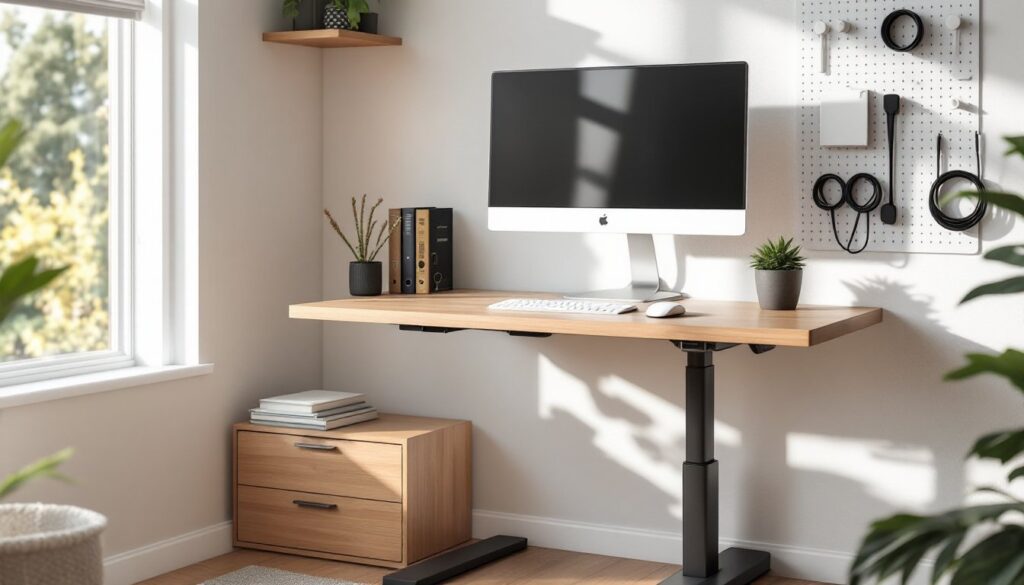
Wall-mounted storage gets items off your desk entirely and is ideal if your standing desk is positioned near a wall. A pegboard with hooks and shelves can hold headphones, cable spools, and reference binders without eating desktop real estate. Install a 1/2-inch plywood backing directly to the wall studs (or use a stud finder if you’re unsure), then mount the pegboard on top. This gap allows peg hooks to grip properly and prevents the board from warping.
Alternatively, metal rail systems (like those used in commercial kitchens) offer adjustable shelving and a modern look. Mount them 16 to 24 inches above your desk surface, high enough to see your monitor, low enough to reach without stretching. Use lag bolts or heavy-duty anchors rated for at least 50 pounds per shelf. Verify you’re hitting studs: drywall alone won’t hold the weight.
One caveat: wall storage only works if your desk isn’t mobile. If you’re moving or rearranging frequently, go with freestanding or desk-mounted options instead. Also, some rental agreements restrict wall modifications, so check your lease first.
Standalone Storage Accessories and Organizers
Standalone organizers are the flexible option, no installation, no commitment. A desktop file organizer or small cabinet sits beside your monitor and holds documents without drilling holes. Look for units with adjustable dividers so you can customize slots for different paper sizes (legal, letter, A4).
For cables, a cable management box or sleeve keeps cords bundled and labeled. Spend a few minutes upfront labeling each cable with a label maker or painter’s tape. You’ll thank yourself when you need to unplug something without unplugging everything. If your standing desk has exposed lift columns or gaps in the frame, route cables through those rather than across the desktop or down the back leg.
Small shelving units or storage cubes (24 inches wide, 12 inches deep) can slide under your desk or beside it without taking up prime workspace. They’re particularly useful if you work with reference books, binders, or backup supplies. Ensure the unit is stable and won’t tip if you brush against it while standing. A 2-3 foot tall unit is ideal, tall enough to be useful, short enough not to block your sightline.
Drawer dividers and trays turn a single large drawer into organized zones for different item types. Use these if your desk came with storage but needs better partitioning. Measure the drawer’s interior and look for expandable dividers or modular inserts that fit snugly without rattling.
DIY Storage Hacks for Your Standing Desk Setup
If you’re handy and want to customize storage to your exact needs, DIY options are cost-effective and surprisingly straightforward. One classic hack is mounting a shallow shelf (8-10 inches deep) to the wall above your desk using floating shelf brackets. This keeps daily-use items visible and at eye level without cluttering your desktop. Use a level when installing: even a half-degree slope looks wrong and cables roll off.
For cable management, drill two 1-inch holes through the back of your desk and thread PVC conduit or fabric sleeves through them. This creates a clean cable run from your power strip to your monitor and peripherals. Secure the conduit with cable clamps every 12 inches so it doesn’t sag. If you’re drilling into a desktop, use a spade bit (faster and cleaner than a standard bit for large holes) and sand the edges smooth afterward to prevent fraying.
Another option: repurpose vintage filing cabinets or small dressers as under-desk storage. Look for units around 24 inches wide and 16-18 inches tall so they fit snugly beneath your desktop. Sand and paint them to match your workspace aesthetic. This works especially well if you need file storage for contracts, receipts, or reference documents.
For the budget-conscious, open wooden shelving made from 2×10 boards and metal brackets can hold books, boxes, and supplies. Instructables and The Handyman’s Daughter have solid step-by-step guides for building simple shelves, and Fix This Build That offers free woodworking plans if you want something more polished. Prime and paint everything before assembly to avoid drips and dust settling on your work. Use wood filler on any screw holes or gaps, sand smooth, and apply two coats of paint for durability and a finished appearance.
If your standing desk height adjusts electronically, make sure any DIY storage doesn’t interfere with the lift mechanism. Mount things 3+ inches away from the support columns and test the full range of motion before calling the project done. A storage unit that blocks a desk leg from extending defeats the entire purpose.
Conclusion
Standing desk storage isn’t one-size-fits-all. Your setup depends on your work style, available space, and budget. Start by inventorying what actually sits on or around your desk, then choose storage that keeps those items accessible and your workspace clear. Whether you go with built-in drawers, wall-mounted shelving, or a quick DIY hack, the payoff is real: fewer distractions, better posture, and a desk that actually looks like someone competent works there. Home office storage solutions designed with function in mind transform both productivity and your daily work experience.